AI Blog Writing: How to Automate Blog Posts Without Losing SEO Control
By Rishabh Poddar • Founder, TeamCopilot •
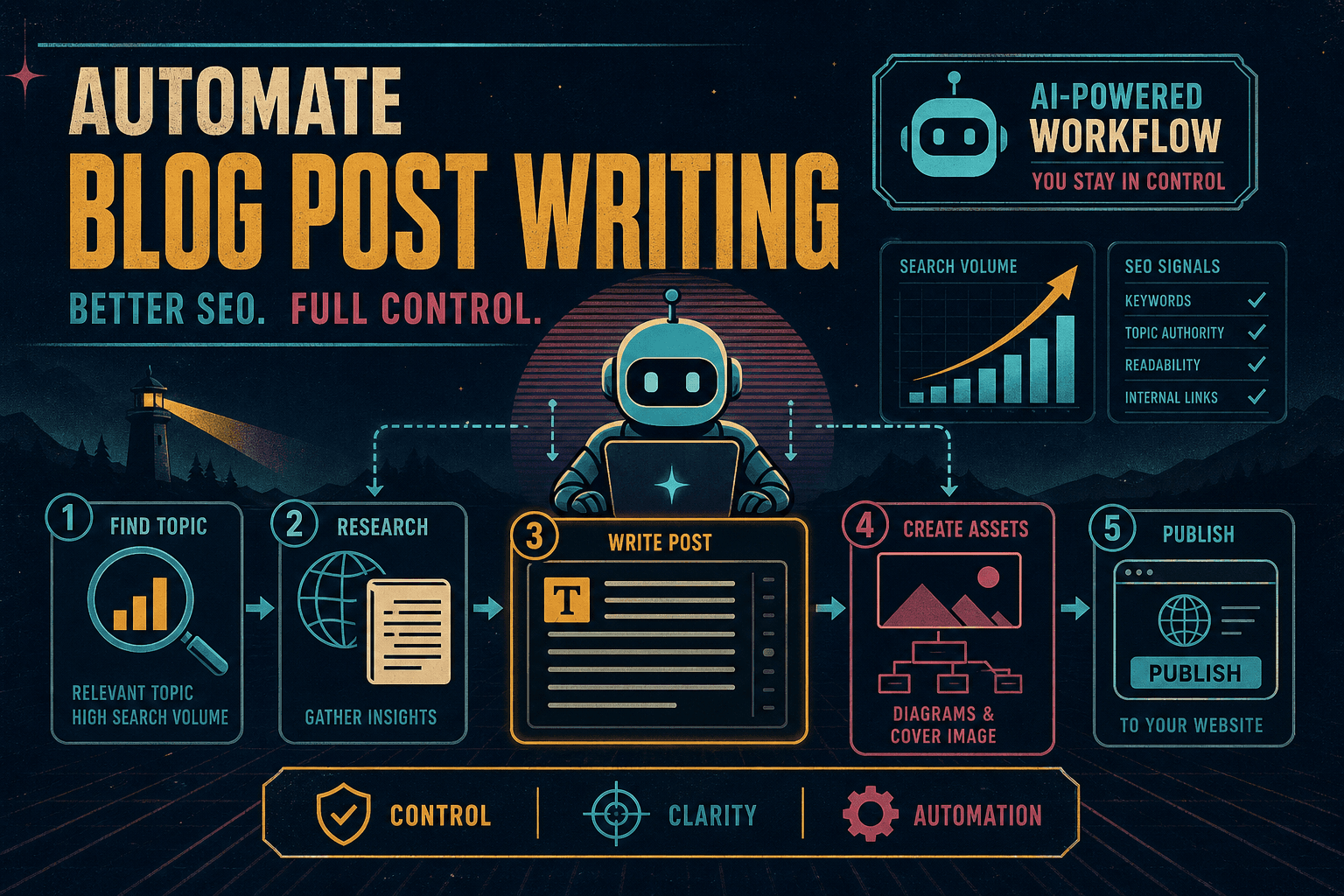
This post explains how to automate blog post writing for your product in a way that improves SEO without giving up control. There are plenty of AI tools that can generate posts quickly, but most of them leave you with very little say over the details, which often leads to low-quality content. At a high level, writing a new blog post involves the following steps:
Finding a topic that is relevant to your product and has a good search volume.
Researching the topic online.
Writing the post.
Creating diagrams and a cover image.
Publishing the post to your website.
I’ll walk through a workflow that covers all of these steps using TeamCopilot.ai, but you can apply the same approach with any other coding agent.
We will use gpt-5.4-mini for this workflow, but any model that is equal or better should also work.
You must have edit access to the website where you want to publish the blog posts. In this post, we assume you have a GitHub repo where you want to publish the blog posts and all related assets.
We also assume that you can place .md and .mdx files in the git repo and have them automatically converted into HTML files and published to your website.
There must be some documentation / example blog posts / AI skill file in your github project that can be used as a reference for the agent on where to place the new blog post and cover image.
Overall flow
The agent should follow these steps:
Rendering diagram
The advantage of using TeamCopilot for this workflow is that you retain control over every step. If you do not like part of the post or want to make the flow more complex, you can adjust it easily.
1) Setup useful skills and workflows
The workflow needs these helper tools:
Web search
Image generation
Humanizing text
SEO keyword volume lookup
Web search skill
For web search, use Tavily. First, sign up at https://www.tavily.com/ and get your API key. Then go to the "Browse skills" section on TeamCopilot, click create skill, name it tavily-web-search, and add the following content to the skill file:
1---
2name: "tavily-web-search"
3description: "Run Tavily web search and extraction directly via API and return concise, cited results."
4required_secrets:
5 - TAVILY_SECRET
6---
78# Tavily Web Search Skill
910Use this skill when the user asks for web research, current events lookup, source discovery, or webpage content extraction.
1112## Input expected from user
13- Research question or topic.
14- Optional constraints: date range, domains to include/exclude, number of results, depth.
1516## Secret handling
17- Authenticate with `{{SECRET:TAVILY_SECRET}}` only.
18- Never print secret values.
19- If missing, tell user to add `TAVILY_SECRET` in TeamCopilot Profile Secrets.
2021## API usage
22Use Tavily REST endpoints with JSON requests.
2324### 1) Search
25Endpoint: `https://api.tavily.com/search`
2627Example command:
28```bash
29curl -sS "https://api.tavily.com/search" -H "Content-Type: application/json" -d '{
30 "api_key": "{{SECRET:TAVILY_SECRET}}",
31 "query": "<USER_QUERY>",
32 "search_depth": "advanced",
33 "max_results": 8,
34 "include_answer": true,
35 "include_raw_content": false,
36 "include_images": false
37}'
38```
3940Optional request fields when relevant:
41- `topic`: `general` | `news`
42- `include_domains`: string[]
43- `exclude_domains`: string[]
44- `days`: number (for recent news)
4546### 2) Extract (optional)
47When the user asks for deeper page-level synthesis, call extract for selected URLs from search results.
4849Endpoint: `https://api.tavily.com/extract`
5051Example command:
52```bash
53curl -sS "https://api.tavily.com/extract" -H "Content-Type: application/json" -d '{
54 "api_key": "{{SECRET:TAVILY_SECRET}}",
55 "urls": ["https://example.com/article"],
56 "extract_depth": "advanced",
57 "include_images": false
58}'
59```
6061## Execution workflow
621. Rewrite the user request into a precise search query.
632. Run Tavily search.
643. Select the strongest sources (relevance + credibility).
654. If needed, run extract on top URLs.
665. Return a concise synthesis with source links.
6768## Output format
69- Start with 2-5 bullet key findings.
70- Then `Sources:` list with title + URL.
71- If uncertain or conflicting, say so clearly.
7273## Quality bar
74- Prefer primary sources and reputable publications.
75- Avoid over-claiming from a single source.
76- Keep response concise unless user asks for depth.
7778## Error handling
79- If Tavily returns auth error: ask user to verify `TAVILY_SECRET`.
80- If no useful results: broaden query once, then report limitations.
81- If endpoint errors persist: return what failed and suggested retry.
Finally, add TAVILY_SECRET to your profile secrets.
Image generation workflow
We will use the image-2 mode from GPT for this. You will need to get an OpenAI key and add it to your profile secrets with the name OPENAI_API_KEY. This will be a Python workflow rather than a skill file. The agent that writes the blog will run the script with a prompt describing the image, and the script will call the OpenAI API and save the file locally.
You can create this workflow, named gpt-image-2-generator, by going to the "AI chat" section and telling the agent:
1Create a new image generation workflow based on the following script:
23import argparse
4import base64
5import json
6import mimetypes
7import os
8import tempfile
9import sys
10import urllib.error
11import urllib.request
12from pathlib import Path
13from uuid import uuid4
141516API_URL = "https://api.openai.com/v1/images/generations"
17EDIT_API_URL = "https://api.openai.com/v1/images/edits"
18MODEL = "gpt-image-2"
19ALLOWED_IMAGE_MIME_TYPES = {"image/png", "image/jpeg", "image/webp"}
20DOWNLOAD_HEADER_SETS = [
21 {},
22 {
23 "User-Agent": (
24 "Mozilla/5.0 (X11; Linux x86_64) AppleWebKit/537.36 "
25 "(KHTML, like Gecko) Chrome/124.0.0.0 Safari/537.36"
26 ),
27 "Accept": "image/avif,image/webp,image/apng,image/*,*/*;q=0.8",
28 },
29 {
30 "User-Agent": (
31 "Mozilla/5.0 (Macintosh; Intel Mac OS X 10_15_7) "
32 "AppleWebKit/605.1.15 (KHTML, like Gecko) Version/17.0 Safari/605.1.15"
33 ),
34 "Accept": "image/avif,image/webp,image/apng,image/*,*/*;q=0.8",
35 },
36]
373839def mime_to_suffix(mime_type: str) -> str:
40 return {
41 "image/png": ".png",
42 "image/jpeg": ".jpg",
43 "image/webp": ".webp",
44 }.get(mime_type, ".img")
454647def sniff_image_mime_type(data: bytes, content_type: str | None = None) -> str:
48 if content_type:
49 mime_type = content_type.split(";", 1)[0].strip().lower()
50 if mime_type in ALLOWED_IMAGE_MIME_TYPES:
51 return mime_type
5253 if data.startswith(b"\x89PNG\r\n\x1a\n"):
54 return "image/png"
55 if data.startswith(b"\xff\xd8\xff"):
56 return "image/jpeg"
57 if len(data) >= 12 and data[:4] == b"RIFF" and data[8:12] == b"WEBP":
58 return "image/webp"
5960 raise RuntimeError("Downloaded file is not a supported PNG, JPEG, or WebP image")
616263def build_multipart_body(fields: dict[str, str], file_field_name: str, file_path: Path) -> tuple[bytes, str]:
64 boundary = f"----teamcopilot-{uuid4().hex}"
65 parts = []
6667 for name, value in fields.items():
68 parts.append(
69 (
70 f"--{boundary}\r\n"
71 f'Content-Disposition: form-data; name="{name}"\r\n\r\n'
72 f"{value}\r\n"
73 ).encode("utf-8")
74 )
7576 mime_type = mimetypes.guess_type(file_path.name)[0] or "application/octet-stream"
77 parts.append(
78 (
79 f"--{boundary}\r\n"
80 f'Content-Disposition: form-data; name="{file_field_name}"; filename="{file_path.name}"\r\n'
81 f"Content-Type: {mime_type}\r\n\r\n"
82 ).encode("utf-8")
83 )
84 parts.append(file_path.read_bytes())
85 parts.append(b"\r\n")
86 parts.append(f"--{boundary}--\r\n".encode("utf-8"))
87 return b"".join(parts), boundary
888990def download_reference_image(url: str) -> Path:
91 last_error: str | None = None
9293 for headers in DOWNLOAD_HEADER_SETS:
94 request = urllib.request.Request(url, headers=headers, method="GET")
95 try:
96 with urllib.request.urlopen(request, timeout=300) as response:
97 content_type = response.headers.get("Content-Type")
98 image_bytes = response.read()
99 mime_type = sniff_image_mime_type(image_bytes, content_type)
100 suffix = mime_to_suffix(mime_type)
101 with tempfile.NamedTemporaryFile(delete=False, suffix=suffix) as temp_file:
102 temp_file.write(image_bytes)
103 return Path(temp_file.name)
104 except urllib.error.HTTPError as exc:
105 error_body = exc.read().decode("utf-8", errors="replace")
106 last_error = f"HTTP {exc.code}: {error_body}"
107 if exc.code in {403, 429}:
108 continue
109 raise RuntimeError(f"Failed to download reference image with {last_error}") from exc
110 except urllib.error.URLError as exc:
111 last_error = str(exc.reason)
112 continue
113114 raise RuntimeError(
115 "Failed to download reference image after retrying with browser-like headers: "
116 f"{last_error or 'unknown error'}"
117 )
118119120def resolve_reference_image(reference_image_http_link: str) -> tuple[Path, Path | None]:
121 if not reference_image_http_link.startswith(("http://", "https://")):
122 raise RuntimeError("reference_image_http_link must be an HTTP or HTTPS URL")
123124 temp_path = download_reference_image(reference_image_http_link)
125 return temp_path, temp_path
126127128def generate_image(prompt: str, reference_image_http_link: str | None = None) -> bytes:
129 api_key = os.environ["OPENAI_API_KEY"]
130 if reference_image_http_link:
131 image_path, cleanup_path = resolve_reference_image(reference_image_http_link)
132 try:
133 body, boundary = build_multipart_body(
134 {"model": MODEL, "prompt": prompt},
135 "image",
136 image_path,
137 )
138 request = urllib.request.Request(
139 EDIT_API_URL,
140 data=body,
141 headers={
142 "Authorization": f"Bearer {api_key}",
143 "Content-Type": f"multipart/form-data; boundary={boundary}",
144 },
145 method="POST",
146 )
147 finally:
148 if cleanup_path is not None:
149 try:
150 cleanup_path.unlink(missing_ok=True)
151 except OSError:
152 pass
153 else:
154 payload = {
155 "model": MODEL,
156 "prompt": prompt,
157 }
158 request = urllib.request.Request(
159 API_URL,
160 data=json.dumps(payload).encode("utf-8"),
161 headers={
162 "Authorization": f"Bearer {api_key}",
163 "Content-Type": "application/json",
164 },
165 method="POST",
166 )
167168 try:
169 with urllib.request.urlopen(request, timeout=300) as response:
170 body = response.read().decode("utf-8")
171 except urllib.error.HTTPError as exc:
172 error_body = exc.read().decode("utf-8", errors="replace")
173 raise RuntimeError(
174 f"OpenAI image generation failed with HTTP {exc.code}: {error_body}"
175 ) from exc
176 except urllib.error.URLError as exc:
177 raise RuntimeError(f"Failed to reach OpenAI API: {exc.reason}") from exc
178179 response_json = json.loads(body)
180 try:
181 image_b64 = response_json["data"][0]["b64_json"]
182 except (KeyError, IndexError, TypeError) as exc:
183 raise RuntimeError(f"Unexpected OpenAI response shape: {response_json}") from exc
184185 return base64.b64decode(image_b64)
186187188def main() -> int:
189 parser = argparse.ArgumentParser(description="Generate an image with GPT Image 2")
190 parser.add_argument("--prompt", required=True, help="Text prompt for the image")
191 parser.add_argument(
192 "--reference_image_http_link",
193 required=False,
194 help="Optional HTTP/HTTPS URL to a reference image for the generation request",
195 )
196 args = parser.parse_args()
197198 data_dir = Path(__file__).resolve().parent / "data"
199 data_dir.mkdir(parents=True, exist_ok=True)
200201 image_bytes = generate_image(args.prompt, args.reference_image_http_link)
202 image_path = data_dir / f"{uuid4()}.png"
203 image_path.write_bytes(image_bytes)
204205 print(f"Saved image to: {image_path}")
206 return 0
207208209if __name__ == "__main__":
210 sys.exit(main())
This script accepts a prompt and an optional reference image URL, then generates an image using the OpenAI API. The reference image can help steer the model toward specific elements. For example, if the blog is about a product or company, the agent can pass in the relevant logo so the generated image includes it somewhere.
Humanizing text
This workflow converts the blog draft into a more natural-sounding version. It looks for patterns that are common in AI-generated text and rewrites them without losing semantic meaning. You can read about how to set this up in this blog: How to Humanize AI Text Without Sounding Robotic.
Once again, create this workflow through the AI chat section and have the agent build it from the code in the blog link above. Name the workflow humanise-text.
SEO keyword volume lookup skill
Use dataforseo.com for keyword volume research. Sign up on the site to get your API key and add it to your profile secrets with the name DATA_FOR_SEO_KEY. Then create a new skill called dataforseo-keyword-api and add the following content to it:
1---
2name: "dataforseo-keyword-api"
3description: "Query DataForSEO API directly for SEO keyword research and related keyword metrics."
4required_secrets:
5 - DATA_FOR_SEO_KEY
6---
78# DataForSEO Keyword API Skill
910Use this skill when the user wants keyword research data from DataForSEO directly via API.
1112## What this skill covers
13- Keyword search volume
14- Keyword suggestions
15- Related keywords
16- Keyword ideas
17- Keyword overview
18- Bulk keyword difficulty
19- Search intent
20- SERP competitors
21- Live Google organic SERPs
22- Google Trends explore
23- DataForSEO Trends explore
24- Historical keyword data
25- Clickstream-normalized search volume
26- Optional supporting location and language lookup
2728Do not explain MCP setup. Use the underlying DataForSEO HTTP API directly.
2930## Auth
31DataForSEO uses Basic Auth.
3233Assume `DATA_FOR_SEO_KEY` contains `login:password`.
3435Build the header like this:
36```bash
37cred="$(printf '%s' "{{SECRET:DATA_FOR_SEO_KEY}}" | base64)"
38-H "Authorization: Basic ${cred}"
39```
4041When using a top-level `curl` command, you can also pass the secret directly with `--user "{{SECRET:DATA_FOR_SEO_KEY}}"` instead of building the header manually.
4243If the user’s credential format differs, ask them to store `login:password` in `DATA_FOR_SEO_KEY`.
4445## Base URL
46`https://api.dataforseo.com`
4748## Keyword endpoints to use
49Prefer these for SEO keyword work:
50- `POST /v3/dataforseo_labs/google/keyword_suggestions/live`
51- `POST /v3/dataforseo_labs/google/related_keywords/live`
52- `POST /v3/dataforseo_labs/google/keyword_ideas/live`
53- `POST /v3/dataforseo_labs/google/keyword_overview/live`
54- `POST /v3/dataforseo_labs/google/bulk_keyword_difficulty/live`
55- `POST /v3/dataforseo_labs/google/search_intent/live`
56- `POST /v3/dataforseo_labs/google/serp_competitors/live`
57- `POST /v3/serp/google/organic/live/advanced`
58- `POST /v3/dataforseo_labs/google/historical_keyword_data/live`
59- `POST /v3/keywords_data/google_ads/search_volume/live`
60- `POST /v3/keywords_data/google_trends/explore/live`
61- `POST /v3/keywords_data/dataforseo_trends/explore/live`
62- `POST /v3/keywords_data/clickstream_data/dataforseo_search_volume/live`
6364Optional helpers:
65- `GET /v3/dataforseo_labs/locations_and_languages`
66- `GET /v3/keywords_data/google_ads/locations`
67- `GET /v3/keywords_data/google_ads/languages`
68- `GET /v3/keywords_data/clickstream_data/locations_and_languages`
69- `GET /v3/dataforseo_labs/google/available_history/live`
7071## Endpoint map
7273- `keyword_suggestions`: long-tail keyword variants containing the seed phrase.
74- `related_keywords`: SERP-related queries and broader adjacent ideas.
75- `keyword_ideas`: category-based keyword expansion for one or more seeds.
76- `keyword_overview`: combined keyword metrics for known terms.
77- `bulk_keyword_difficulty`: KD score for a list of keywords.
78- `search_intent`: intent classification and probability.
79- `serp_competitors`: domains ranking for a keyword set.
80- `serp/google/organic/live/advanced`: current organic SERP with features and rankings.
81- `google_trends/explore/live`: Google Trends popularity for up to 5 keywords.
82- `dataforseo_trends/explore/live`: DataForSEO Trends popularity for up to 5 keywords.
83- `historical_keyword_data`: historical monthly keyword data.
84- `google_ads/search_volume`: Google Ads search volume and paid metrics.
85- `clickstream_data/dataforseo_search_volume`: clickstream-normalized volume.
8687## Request shape
88Most keyword endpoints accept a JSON array in the POST body.
8990Use `location_name` or `location_code`, and `language_name` or `language_code` when required.
9192Common fields:
93- `keyword` or `keywords`
94- `location_name` or `location_code`
95- `language_name` or `language_code`
96- `limit`
97- `depth`
98- `filters`
99- `order_by`
100101Batch limits to remember:
102- `keyword_suggestions`: 1 keyword
103- `related_keywords`: 1 keyword
104- `keyword_ideas`: up to 200 keywords
105- `keyword_overview`: up to 700 keywords
106- `bulk_keyword_difficulty`: up to 1000 keywords
107- `search_intent`: up to 1000 keywords
108- `serp_competitors`: up to 200 keywords
109- `google_trends/explore/live`: up to 5 keywords
110- `dataforseo_trends/explore/live`: up to 5 keywords
111- `serp/google/organic/live/advanced`: 1 keyword
112113## Examples
114115### 1) Keyword suggestions
116```bash
117curl --location --request POST "https://api.dataforseo.com/v3/dataforseo_labs/google/keyword_suggestions/live" \
118 -H "Authorization: Basic ${cred}" \
119 -H "Content-Type: application/json" \
120 --data-raw '[
121 {
122 "keyword": "seo keyword research",
123 "location_name": "United States",
124 "language_name": "English",
125 "limit": 10
126 }
127 ]'
128```
129130### 2) Related keywords
131```bash
132curl --location --request POST "https://api.dataforseo.com/v3/dataforseo_labs/google/related_keywords/live" \
133 -H "Authorization: Basic ${cred}" \
134 -H "Content-Type: application/json" \
135 --data-raw '[
136 {
137 "keyword": "seo keyword research",
138 "location_name": "United States",
139 "language_name": "English",
140 "depth": 1,
141 "limit": 10
142 }
143 ]'
144```
145146### 3) Google Ads search volume
147```bash
148curl --location --request POST "https://api.dataforseo.com/v3/keywords_data/google_ads/search_volume/live" \
149 -H "Authorization: Basic ${cred}" \
150 -H "Content-Type: application/json" \
151 --data-raw '[
152 {
153 "keywords": ["seo keyword research", "keyword ideas"],
154 "location_name": "United States",
155 "language_name": "English"
156 }
157 ]'
158```
159160### 4) Clickstream search volume
161```bash
162curl --location --request POST "https://api.dataforseo.com/v3/keywords_data/clickstream_data/dataforseo_search_volume/live" \
163 -H "Authorization: Basic ${cred}" \
164 -H "Content-Type: application/json" \
165 --data-raw '[
166 {
167 "keywords": ["seo keyword research", "keyword ideas"],
168 "location_name": "United States"
169 }
170 ]'
171```
172173### 5) Keyword overview
174```bash
175curl --location --request POST "https://api.dataforseo.com/v3/dataforseo_labs/google/keyword_overview/live" \
176 -H "Authorization: Basic ${cred}" \
177 -H "Content-Type: application/json" \
178 --data-raw '[
179 {
180 "keywords": ["seo keyword research", "keyword ideas"],
181 "location_name": "United States",
182 "language_name": "English",
183 "include_clickstream_data": true
184 }
185 ]'
186```
187188### 6) Search intent
189```bash
190curl --location --request POST "https://api.dataforseo.com/v3/dataforseo_labs/google/search_intent/live" \
191 -H "Authorization: Basic ${cred}" \
192 -H "Content-Type: application/json" \
193 --data-raw '[
194 {
195 "keywords": ["seo keyword research", "keyword ideas"],
196 "language_name": "English"
197 }
198 ]'
199```
200201### 7) SERP competitors
202```bash
203curl --location --request POST "https://api.dataforseo.com/v3/dataforseo_labs/google/serp_competitors/live" \
204 -H "Authorization: Basic ${cred}" \
205 -H "Content-Type: application/json" \
206 --data-raw '[
207 {
208 "keywords": ["seo keyword research"],
209 "location_name": "United States",
210 "language_name": "English",
211 "limit": 10
212 }
213 ]'
214```
215216### 8) Live organic SERP
217```bash
218curl --location --request POST "https://api.dataforseo.com/v3/serp/google/organic/live/advanced" \
219 -H "Authorization: Basic ${cred}" \
220 -H "Content-Type: application/json" \
221 --data-raw '[
222 {
223 "keyword": "seo keyword research",
224 "location_code": 2840,
225 "language_code": "en",
226 "depth": 100
227 }
228 ]'
229```
230231### 9) Google Trends explore
232```bash
233curl --location --request POST "https://api.dataforseo.com/v3/keywords_data/google_trends/explore/live" \
234 -H "Authorization: Basic ${cred}" \
235 -H "Content-Type: application/json" \
236 --data-raw '[
237 {
238 "keywords": ["seo keyword research", "keyword ideas"],
239 "location_name": "United States"
240 }
241 ]'
242```
243244### 10) DataForSEO Trends explore
245```bash
246curl --location --request POST "https://api.dataforseo.com/v3/keywords_data/dataforseo_trends/explore/live" \
247 -H "Authorization: Basic ${cred}" \
248 -H "Content-Type: application/json" \
249 --data-raw '[
250 {
251 "keywords": ["seo keyword research", "keyword ideas"],
252 "location_name": "United States"
253 }
254 ]'
255```
256257## Workflow
2581. Identify the best endpoint for the user’s intent.
2592. Choose a seed keyword list and a location/language.
2603. Call the endpoint with JSON POST data.
2614. Return the raw result plus a short interpretation.
262263## Interpretation guidance
264- Use `search_volume` for demand.
265- Use `competition` and `cpc` for paid difficulty signals.
266- Use `depth` for broader related-keyword expansion.
267- Use historical data when trend direction matters.
268- Prefer exact API output over paraphrasing when precision matters.
269270## Error handling
271- 401 or auth failures: tell the user to verify `DATA_FOR_SEO_KEY` contains valid `login:password`.
272- Invalid location/language: point to the relevant lookup endpoint.
273- Empty results: broaden the seed keyword or increase `limit`/`depth`.
274275## Output format
276- Return the endpoint used.
277- Return the request payload summary.
278- Return the top results.
279- Note any filters or assumptions.
2) Setup the github repo of your website
Open the AI chat tab and ask the agent to clone your GitHub repo into the workspace. If the repo is private, add your GitHub access token to profile secrets before starting a chat.
3) Create the blog-post-writing skill
In the skills tab, create a new skill called blog-post-writing and add the following content to it:
1---
2name: "blog-post-writing"
3description: "This skill has instructions on how to do blog post writing for a project"
4required_secrets: []
5---
67# Blog post writing
89## News searching guidelines
10- Search only reputable sites in the insutry of the project.
11- Start the search with a generic phrase like "top news in ... industry for the week" and "trending news in ... industry for the week", to get an extensive list of news
12- Once you have that list, then filter it to see if they fit the project in any way. It doesn't have to match the project exactly.
1314## Writing guidelines
15- See existing blog posts in the project to get an idea of how to write (the tone, paragraph length etc).
16- Keep language as simple as possible, without loosing information (if you must use technical words, use them, but don't overdo it).
17- Use proper paragraphs with related sentences grouped together. Do NOT write one sentence per paragraph except for a rare intentional emphasis line.
18- Prefer a simple narrative structure for news or incident posts: what happened, why it happened, how to prevent it, and where the product fits if relevant.
19- Tell incident/news sections like a story before moving into analysis. Avoid jumping straight into checklists.
20- Use bullets only when they make scanning genuinely easier, such as prevention checklists, feature lists, or source lists. Do not use bullets as a substitute for paragraphs.
21- Make the writing natural sounding and clear.
22- End every blog post with an FAQ section when appropriate for the topic.
23- Do NOT use em dashes.
24- Minimise repetition of content in the blog.
25- See human-writing-ghost skill for more guidelines
2627## Useful `dfs-mcp-http` endpoints:
2829- `dataforseo_labs_google_keyword_ideas`
30- `dataforseo_labs_google_keyword_suggestions`
31- `dataforseo_labs_google_keyword_overview`
32- `dataforseo_labs_bulk_keyword_difficulty`
33- `dataforseo_labs_search_intent`
34- `dataforseo_labs_google_related_keywords`
35- `dataforseo_labs_google_serp_competitors`
36- `serp_organic_live_advanced`
37- `kw_data_google_trends_explore`
38- `kw_data_dfs_trends_explore`
3940## Blog cover images generation
4142Use the gpt-image-2-generator workflow to create a new cover image. Your prompt must look like:
43```
44Generate a cover image for a blog post contianing the following content:
4546"""
47... put full blog content here excluding the title ...
48"""
4950- Make sure the cover image doesn't have too much text.
51- Since this is a cover image, it should be wider than taller.
52- Make the cover image clean and <insert style here - see below> style. Don't put too much details in it, but it should look nice.
53- Make it a light theme cover image.
54```
5556I have provided some of the criteria in the prompt above, but you can feel free to change it as needed based on the blog being written.
5758To keep covers visually diverse across runs:
59- Maintain a `data/past_styles.json` file for the project (in the gpt-image-2-generator workflow).
60- Before generating a cover, read the recent styles from that file and choose a style that has not been used recently.
61- After choosing the style, write it back to `data/past_styles.json` with the current post identifier, date, and the style details that were used.
62- Prefer rotating through noticeably different styles, palettes, and compositions instead of only changing small details.
63- Use one of these cover styles:
64 - Editorial illustration
65 - Cartoon style
66 - Hand-drawn sketch style
67 - Retro poster style
68 - Clean geometric abstract
69 - Paper collage illustration
70 - Soft 3D scene
7172Suggested `data/past_styles.json` shape:
73```json
74{
75 "recent": [
76 {
77 "post": "post-slug-or-title",
78 "date": "2026-05-18",
79 "style": "flat vector",
80 "palette": "blue and orange",
81 "composition": "single central object"
82 }
83 ]
84}
85```
8687If the blog is directly about some other product or company, then make sure that you pass in that company's logo / product's logo into the image generation workflow as reference to be used in the generated image somehow. You can pass in a http link to the logo directly.
This skill contains instructions for different parts of the pipeline. Feel free to adapt any part of it to suit your workflow.
4) Setting up the agent cronjob
A cronjob is a scheduled task that runs at a specific time or interval. In TeamCopilot, you can schedule one from the "Cronjobs" tab. TeamCopilot uses a custom version of the Ralph loop. You can add todos explicitly, or implicitly through a prompt or skill file, and the agent is then prompted to complete each todo one by one until everything is done. The agent can also modify the TODO list during execution, which makes it a turning, complete system capable of running general-purpose workflows. Compared with a regular skill file, the TODO system gives stronger guarantees that the agent will follow the instructions in the right order.
Start by creating a new cronjob and adding the following prompt and todos to it:
Prompt
1Your task it to create a new blog post for <YOUR PROJECT NAME> project as per the "blog-post-writing" skill.
2- About this project: <YOUR PROJECT DESCRIPTION>
3- Project location on disk: <PATH TO THE CLONED GITHUB REPO>
4- Project website: <YOUR PROJECT WEBSITE>
Todo items
Add the following items to the todo list below the prompt:
1
List all current blogs in the project, using titles only.
2
Use the tavily-web-search skill to find the latest news or trending topics from the past week in the project’s industry, then list the relevant items with a two-line summary for each.
3
If no relevant news is found, explain how each news item could be linked to the project, with the goal of educating the reader and subtly promoting the product where possible. Rank the options from highest to lowest priority.
4
If there is still no relevant news, use dataforseo-keyword-api to research what related blog topics make sense.
5
Ask the user which topic they want to write about. Include the news heading, a two-line summary, the date, the article link, and how it connects to the project.
6
After the user picks a topic, do deep web research and read relevant existing articles.
7
Use dataforseo-keyword-api to determine the best title for the post.
8
Write the blog post in the project, but do not create the cover image yet. Include an extensive FAQ and link to existing posts where appropriate.
9
Run the blog through the humanise-text workflow, then replace the main content with the rewritten output.
10
Generate the cover image, update the style history, and use a reference logo if the post is about another product or company.
11
Move the generated image into the project, update the frontmatter, commit the changes, and push them to main.
5) Add a CTA to the blog post
Make sure that your blog post templates have a CTA button at the bottom of the post. It should be clearly visible and easy to click. Something like this:
6) Get Google to index your blog
Once your blog is published, the quickest way to get Google to index it is to submit the page URL on the Google search console and request indexing. This is a very important step, so ensure that you do this each time, and it can only be done manually as of today (Google has no API for this).
7) Results
With this cronjob, you can expect new blog posts that are distinct from previous ones, SEO optimized, read like they were written by a human, and paired with varied cover images. Because the process keeps a human in the loop, you also stay in control of the actual topics.
The total cost per blog should typically be around $0.20 to $0.50 if you use the GPT-5.4-mini model and the image-2 model for image generation.
You should monitor the performance of each blog post over time to see which ones are performing well, and include those learnings as part of the agent workflow.
Support the project
If this was useful, star TeamCopilot on GitHub.
TeamCopilot is a shared AI agent for teams with centralized context, permissions, and workflows.