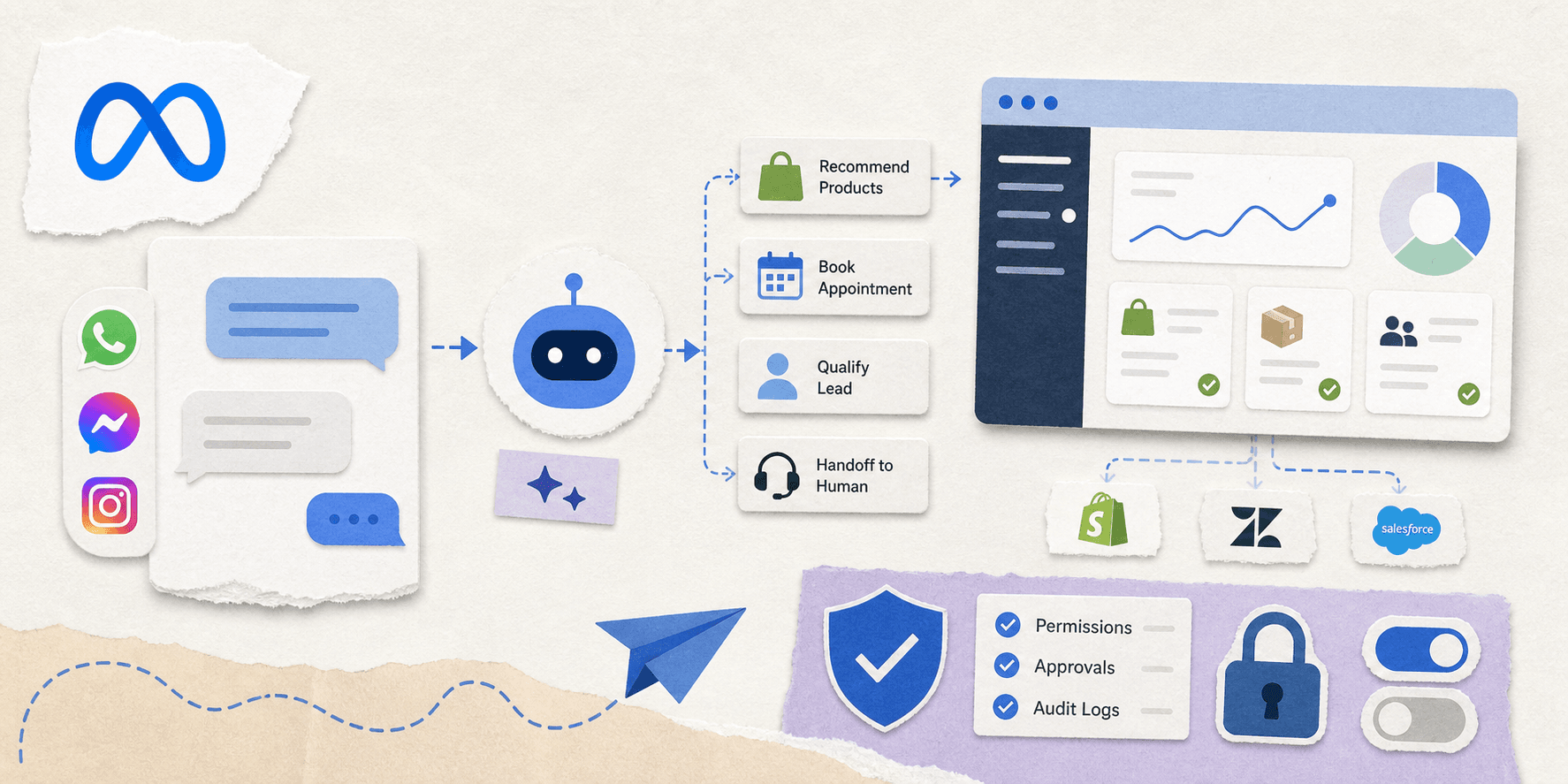
Meta is betting that the business inbox is the next major home for AI. The company recently launched Meta Business Agent, an AI tool designed to answer customer questions, book appointments, and close sales directly inside messaging apps. Alongside this, Meta is rolling out a broader platform featuring enterprise controls and integrations with tools like Shopify and Zendesk. By connecting directly to these external systems, the agent can update inventory records, process returns, and modify support tickets without requiring a human to copy-paste data between tabs.
What Meta launched
Meta Business Agent acts as an AI layer for WhatsApp, Messenger, and Instagram. It handles routine customer interactions by recommending products from a catalog, qualifying leads, booking appointments, and handing off complex issues to human staff.
For larger companies, the Business Agent Platform connects directly to internal business systems, giving teams more control over how the agent behaves. This fits naturally into existing habits. Customers already expect businesses to answer inside the messaging apps they use daily; Meta is simply automating those conversations.
Why this matters
Meta is turning a high-volume communication channel into an active workflow surface. This brings clear practical benefits: small shops can instantly reply to late-night inquiries, sales representatives can automate lead qualification, and support departments can offload repetitive FAQs. However, connecting an agent to real customers, orders, and business systems changes your risk profile. It is no longer just harmless text generation; it becomes an operational system that requires strict permissions, logging, approvals, and limits. This is the same broader shift we wrote about in AI Agent Governance Is the New Enterprise Control Plane.
The real story is control
Meta says its platform includes enterprise-grade controls and guardrails, which are essential. An agent that books appointments or closes sales does far more than generate copy. Once it connects to CRM data, billing systems, or customer support tools, critical operational questions emerge:
- Who can turn the agent on?
- What data can it see?
- Which actions need approval?
- What happens when it makes a bad call?
- How do you stop it quickly if something goes wrong?
These are core product design challenges, not edge cases. If an AI agent sits in the middle of business operations, the team using it needs a robust control layer. Secret isolation, audit trails, and permissioning are mandatory. For a deeper look at these risks, read Why Your AI Agent Should Never See Your API Keys.
What Meta gets right
Meta has a few real advantages here. They already own the channels where small business communication happens, meaning WhatsApp, Messenger, and Instagram are already built into daily workflows. Additionally, the agent is framed as a practical tool for support, leads, bookings, and sales rather than a research demo. Finally, Meta is building a platform to connect messaging directly to other business systems, positioning itself as the central integration layer rather than just selling a standalone assistant.
What teams should be careful about
The utility of this tool is exactly what makes it risky. Connecting an agent to customer data, internal tools, or order systems means treating it like a real employee rather than a simple widget. The failure modes mirror familiar AI incidents: weak permissions, missing review steps, leaked tokens, and overconfident automation.
This is why incidents like the one detailed in An AI Coding Agent Deleted a Production Database. Here's What Happened and How to Prevent It are relevant even for non-technical tools. Once an agent can act, guardrails are mandatory.
When evaluating Meta Business Agent, start small with these steps:
- Limit the first use case to low-risk support tasks.
- Keep sensitive actions behind explicit approval.
- Isolate secrets and API keys from the model.
- Log every important action.
- Review which systems the agent can actually reach.
This basic hygiene is the difference between a helpful assistant and a major operational incident.
Where TeamCopilot fits
While Meta solves this problem inside its own ecosystem, TeamCopilot addresses the broader challenge. If you need a shared AI agent for diverse workflows-complete with permissions, approvals, secret handling, cronjobs, and reusable skills-TeamCopilot provides that central control layer. It gives teams a secure environment to run agents across all their work, rather than just answering chat messages.
This announcement shows where the market is heading. Businesses want AI inside their existing tools, but they also require a system to keep those agents secure. For a broader comparison of the space, see Best AI Agent Platforms for Teams in 2026: Comparing 13 Tools and OpenAI Symphony Explained: How It Compares to TeamCopilot.
Final take
Meta Business Agent shows how normal agentic software is becoming. Businesses no longer want AI as a side project; they want it integrated directly into their existing communication channels. The next question is whether these agents are safe enough to trust, which is where the real competition lies: winning the market will depend on shipping the best control plane, not just the smartest model.
FAQ
What is Meta Business Agent?
Meta Business Agent is Meta's AI agent for businesses on WhatsApp, Messenger, and Instagram. It can answer questions, recommend products, book appointments, qualify leads, and hand off to humans when needed.
Is Meta Business Agent just a chatbot?
No. The interesting part is that it can take actions and connect to business systems. That makes it closer to an operational agent than a simple chat widget.
Why does this announcement matter?
It shows that enterprise AI is moving into the same channels customers already use. That lowers friction for businesses, but it also raises the need for permissions, logging, and approval workflows.
Does Meta Business Agent replace human support teams?
It handles repetitive work first and escalates harder cases to people. Human review remains essential for edge cases, sensitive decisions, and customer-facing issues.
What is the main risk with a business agent like this?
The main risk is access. If the agent can reach customer data, billing systems, or support tools, then a small mistake can become a real business problem.
What should a business do before turning on an agent?
Start with a narrow use case, keep secrets out of the model, define approval points, and review every integration the agent can reach.
Is this useful for small businesses too?
Yes, small businesses may benefit even more because they usually cannot staff every channel around the clock. The key is to keep the first rollout simple and low risk.
How is TeamCopilot different from Meta Business Agent?
While Meta is focused on its own messaging ecosystem, TeamCopilot is a shared AI agent platform for teams that provides permissions, approvals, workflows, cronjobs, and secret management across broader internal use cases.
What if I want to use AI across support, ops, and internal work?
That is where a control layer matters. A team usually needs more than one channel-specific assistant. It needs a safe place to manage multiple agents and workflows in one system.
What should I read next?
Start with AI Agent Governance Is the New Enterprise Control Plane, then Why Your AI Agent Should Never See Your API Keys, and then Best AI Agent Platforms for Teams in 2026: Comparing 13 Tools.
Support the project
If this was useful, star TeamCopilot on GitHub.
TeamCopilot is a shared AI agent for teams with centralized context, permissions, and workflows.